EN
 RU



 Log in


Fast food, street food and bakery automation: how to speed up the queue and control cost of goods


Author: PayKit POS Editorial Team
Fast food, street food and bakery automation with PayKit POS helps you serve the queue faster and keep an eye on cost of goods. At the register, you get mobile sales, several open tickets, modifiers and combo meals, and card payments via NFC. In inventory, you get automatic write-offs, critical stock levels and ABC/XYZ analysis. You can set up the register on your own Android smartphone in about 15 minutes. The Start plan costs UAH 600/month, and the first month is free. Below, we look at what exactly changes at the register and in inventory.
Why does the lunchtime queue cost you money?
In fast food and street food, revenue is made at peak times: lunch, evening, the after-work rush. That is when every delay multiplies across everyone standing behind the guest. Someone will glance at their watch and go to your neighbor. In a bakery, the same thing happens in the morning: people grab bread and buns on their way to work, and five minutes of waiting is too much for them.
Usually four things eat up time at the register:
- the cashier searches for an item in a long list;
- the payment fails, and you have to count change or retry;
- one guest is paying while everyone else waits;
- the register freezes when the internet drops.
Most of these problems are solved by the right register, not by one more employee behind the counter.
How does PayKit POS speed up service at the register?
The menu in PayKit POS is divided into groups: “Drinks,” “Pastries,” “Hot dishes” and so on. The cashier opens a group and adds an item. If that is too slow, you can search by name, SKU or barcode.
For fast food, modifiers and combo meals matter most. “Burger without onion + fries + cola” is rung up in a few taps, with no need to look up each item separately or calculate the combo discount by hand.
You can keep several tickets open at once: while one guest is choosing, another is already paying. Payment is accepted in cash, by card or via NFC. The receipt is printed immediately, fiscal or regular.
For street trading, it matters that the register works without internet. In offline mode, sales continue, and data syncs with the cloud as soon as the connection returns.
Mobile register: serving the queue on the go
A food truck or a kiosk near the metro has no room for a stationary register. Here a Sunmi POS terminal or even an ordinary smartphone on Android 9 or newer works. Accepting card payments on a smartphone (Tap to Phone) is available through partner banks, including monobank and Oschadbank, so a separate terminal is not needed. To see how this works in practice, read the article “How to open a food truck in Ukraine”.
Online orders: part of the queue arrives already paid
If traffic is heavy, you can move some guests to online ordering. PayKit POS integrates with SalesBox, so orders from the website or a messenger land in the system, and the guest only comes to pick up the ready meal. The register is freed up for those who order on the spot.
What should a bakery do about weighing and evening leftovers?
In a bakery, money is lost in two ways: on the scale and on unsold goods. PayKit POS connects to scales, so pastries sold by weight go into the receipt at the right price with no manual entry. After each sale, stock is written off automatically, and you see what is running out without counting the shelves by eye.
Two things help with evening leftovers:
- Repricing. You create a document and change prices on the items you need.
- Promo lists. You set a list of products with special prices for a chosen period, for example, “evening discount on pastries.”
This way you sell at a small discount what would otherwise be written off. If you are still only planning to open, take a look at “How to open a bakery” and calculate the equipment in advance.
How to control cost of goods and not lose margin?
Cost of goods “drifts” where there are no numbers: purchase prices have changed but the price on the display has not, and some goods disappeared between receiving and sale. Accounting in PayKit POS closes these gaps.
What to review every week:
| Report | What it shows | What to do with it |
|---|---|---|
| Critical stock levels | Items that will soon run out | Reorder before sales dip |
| ABC and XYZ analysis | What brings in money and what just sits | Remove weak items from the menu |
| Sales by cashier | Who rings up how much | Spot deviations by shift |
| Stock movement (Business plan) | Receipts, sales, write-offs for each item | Find where the numbers diverged |
| Cash movement, cashflow (Business plan) | Income and expense categories | See where the money goes |
Two tools help especially. First: incoming invoices that account for suppliers and mutual settlements, so purchase prices are in the system rather than in a notebook. Second: inventory count without stopping sales. An employee walks the shelves with a mobile device while trading carries on. Discrepancies are visible right away, so mis-sorting and natural losses are easy to spot and explain. Inventory count, the stock movement report and cashflow are available on the Business plan. Read more about the process in the article “Inventory count in a store without stopping sales.”
How much does automation cost and which equipment should you choose?
The Start plan at UAH 600/month includes a fiscal register (PRRO), inventory management, product import from Excel, analytics and scale integration. For venues that need inventory counts, the stock movement report, cashflow and a customer database with loyalty, the Business plan is the fit. See current prices on the PayKit POS plans page.
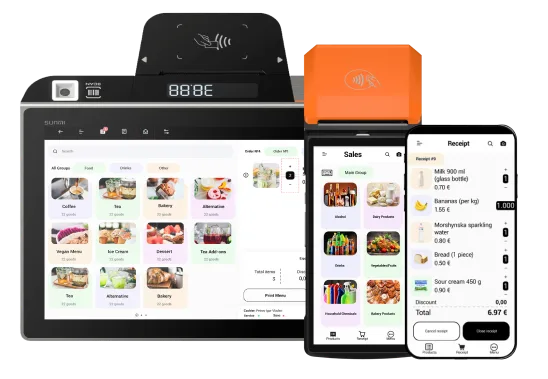
As for equipment, go by the format of your venue:
| Format | What fits | Why |
|---|---|---|
| Food truck, street food | Sunmi V3 or a smartphone | Mobility, built-in receipt printer |
| Bakery with a counter | Sunmi D3 mini or a tablet | Guest-facing screen, room for scales |
| Fast food with a dining area | Sunmi D3 PRO | Large cashier screen and a guest screen with NFC Tap on Glass: no separate bank terminal needed |
The full range of bundles is in the POS equipment catalog.
Where to start the launch?
- Import products from Excel and sort them into groups.
- Connect the printer, scales and, if needed, bank acquiring.
- Take the free training on working with the system.
- Check real stock before launch: on the Business plan this is done through an inventory count, on Start through a goods receipt document with the actual quantity.
- After a week, open the reports and see what sells and what does not.
If you need a terminal together with the register, look at the joint offer with Raiffeisen Bank. Details are in the article “A store register for UAH 33 a day.”
Try PayKit POS free for 30 days: request demo access and see how much faster the queue moves. If you need help choosing a bundle, leave a consultation request.
Frequently asked questions
Does PayKit POS work without internet?
Yes, offline mode lets you keep selling. Data is sent to the cloud when the connection is restored.
Can I accept card payments without a separate terminal?
Yes, via Tap to Phone on a smartphone, if your bank is a PayKit partner. Ask your manager for the current list of banks.
Is the system suitable for a bakery that sells by weight?
Yes, PayKit POS integrates with scales, and stock is written off automatically after each sale.
How long does it take to set up the register?
Basic setup on your own smartphone takes about 15 minutes. Product import and staff training usually need a few more days.