EN
 RU


 Увійти


Remaining money
 02.01.2025
The report “Cash balance” allows you to view and analyse data on cash balances at the POS for the selected period of time.
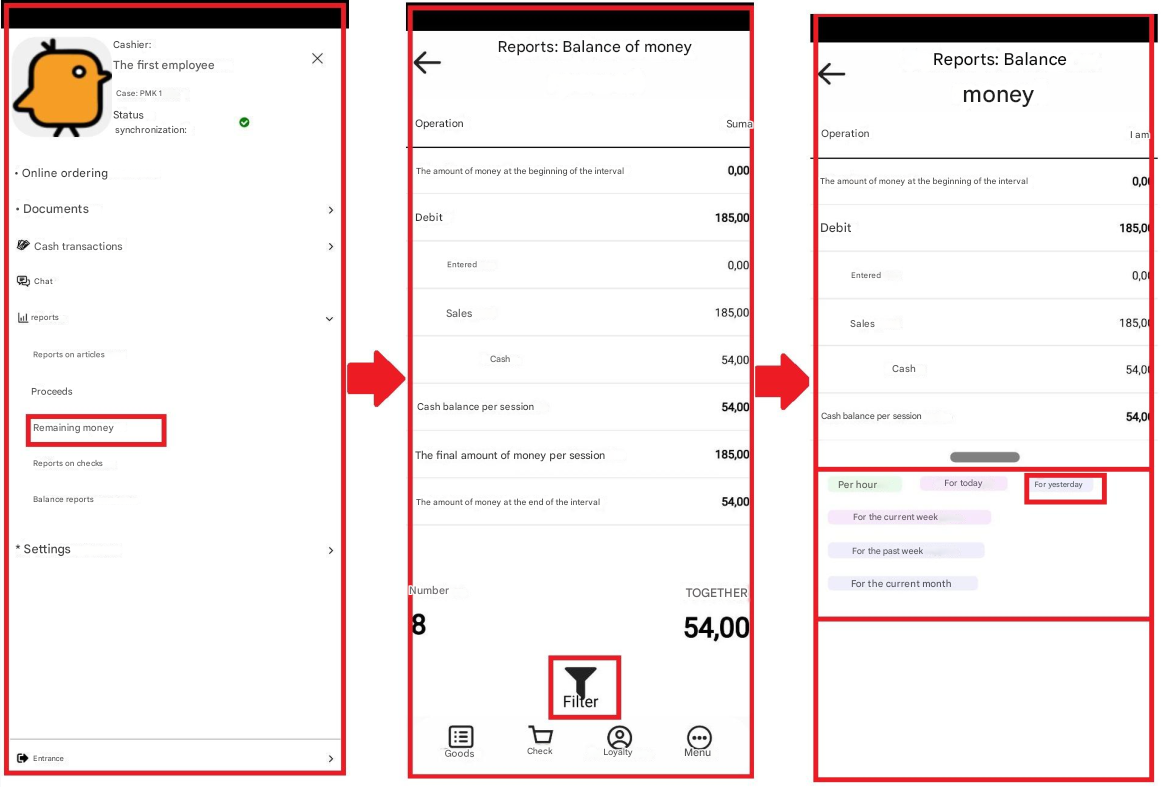
You can generate a report by selecting “Reports” → “Cash balance”.
A window will appear which contains a table that essentially has two columns – transaction and amount.
Transactions are the transactions in the generated report at the POS; Amount is the amount for each transaction.
The cash column “Transaction” has the following lines:
1) Amount of money at the beginning of the interval – the amount of money at the beginning of the selected time interval;
2) Debit – is displayed if there were cash contributions or sales were made;
• Contributed – the amount of money that was contributed to the cash register;
• Sales – goods sales with cash and card separately; 3) Credits (displayed if cash was issued from the cash register or a return was made):
• Issued – the amount of money that was issued from the cash register;
• Returns – returns of goods with cash and card separately;
4) Cash balance for the session;
5) Total amount of money for the session;
6) Amount of money at the end of the interval.
If there is a large amount of data in the report, a vertical scroll appears.
This report also shows the total number of rows and the total amount of money in the cash register, and it also has a filter, by clicking on which, you can choose the time period during which the report will be generated: – per hour; – for today; – for yesterday; – for the current week; – for the last week; – for the current month.