EN
 RU


 Увійти


Revenue
 02.01.2025
The report “Earnings” allows you to view and analyse information about the flow of funds for a selected period of time.
You can generate a report by selecting “Reports” → “Earnings”.
As a result, a window will appear containing a table that has essentially two columns – operation and amount.
Operations – operations, in the generated report on the cash register; Amount – the total amount for each operation.
The cash column “Operation” includes the following lines:
– deposit – service deposit (money deposit) (cash deposit to the cash register);
– sales – displayed sales – with separate breakdown for cash and card;
– returns – displayed cash returns (displayed as negatives);
– withdrawal – service withdrawal (service removal) (withdrawal of cash) (withdrawal of cash from the cash register);
– total – total amount of money – with separate breakdown for cash and card.
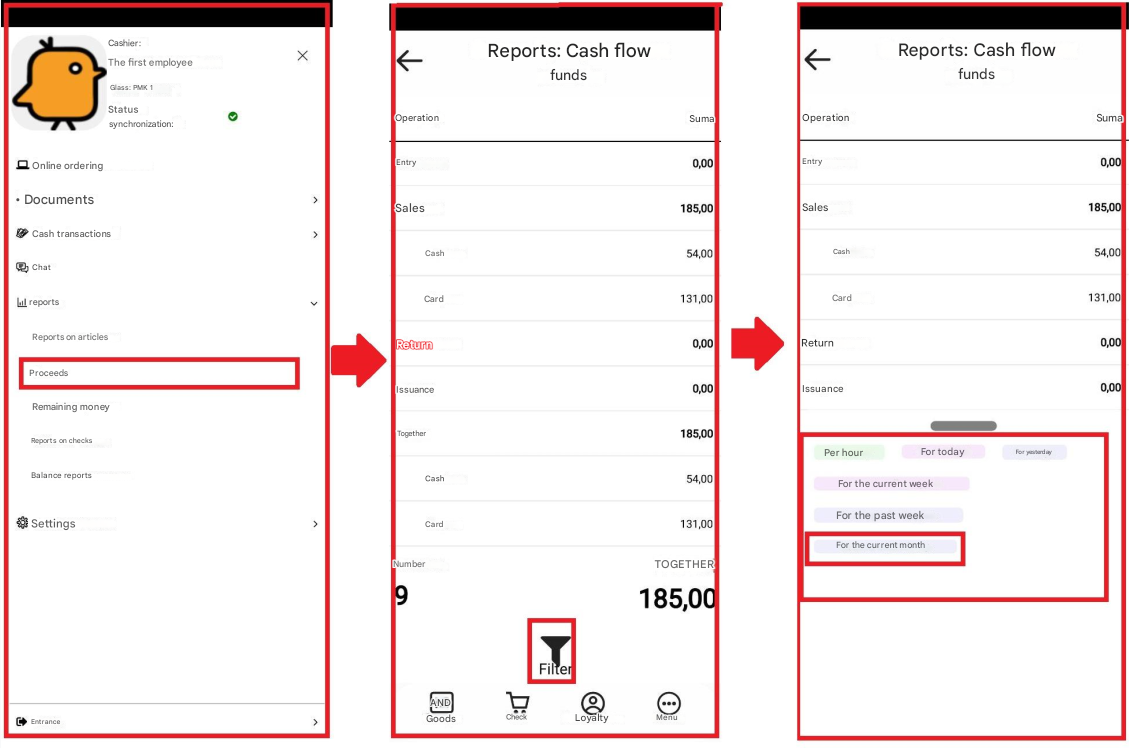
This report also shows the total number of rows and the total amount of money, and it has a filter, by clicking on which, you can select the time period during which the report will be generated:
– by the hour;
– for today;
– for yesterday;
– for the current week;
– for the previous week;
– for the current month.